
Listing the same product across Amazon, Etsy, and a Shopify store means writing three different formats: Amazon wants front-loaded bullet points, Etsy rewards specific searchable tags, Shopify description copy reads more like a story. Doing all three by hand for every SKU is slow. AI is good at the reformatting; it's not a substitute for your actual product photo.
Step 1: Start from one real, well-lit photo; don't generate the hero image
This playbook is about listing copy, not the photo itself. Use a genuine photo of the actual product: buyers on all three platforms can return an item that doesn't match its photos, and marketplaces increasingly flag obviously AI-generated product imagery. Where AI-generated scene images are useful is lifestyle/background shots around a real product photo. See from product photo to on-brand lifestyle scenes for that separate workflow.
Step 2: Write one solid source description, then let AI reformat it per platform
Write a plain, accurate paragraph covering material, dimensions, use case, and what's included in the box. Then ask ChatGPT or Claude to reformat that same source paragraph three ways:
- Amazon: five front-loaded bullet points, benefit first, spec second
- Etsy: a description plus a candidate list of 13 tags, drawing on how buyers actually search rather than internal product names
- Shopify: a slightly longer, more narrative description for an independent store's own brand voice
Keeping one accurate source paragraph means all three formats stay factually consistent with each other; you're not re-describing the product from memory three separate times.
Step 3: Check every number before it goes live
Read every generated bullet and tag for factual drift: a dimension that got rounded wrong, a material claim that's slightly off, a size range that doesn't match your actual size chart. This step is non-negotiable: an inaccurate bullet point on Amazon turns into a return or a bad review, not just a rewrite.
Step 4: Batch it once the format is proven, not before
Once you've hand-checked the pattern on four or five SKUs and you're confident it holds, batch the same three-way reformatting across the rest of your catalog. Still spot-check a sample of the batch output; don't assume consistency holds forever just because it held for the first five.
What to put in the source description
The source paragraph is only as good as the facts you put into it. Before writing it, fill in a short fact block for the SKU. Leave a field blank rather than guessing; a blank field is a question for whoever has the product in hand, not a gap for AI to fill.
Product name: [PRODUCT NAME]
Product type (what a buyer would call it): [GENERIC CATEGORY]
Material: [MATERIAL, as stated on packaging or by the supplier]
Dimensions and weight: [EXACT FIGURES AND UNITS]
Colours / sizes available: [LIST]
What's in the box: [EVERY ITEM THAT SHIPS]
Main use case: [ONE OR TWO SENTENCES]
Care or usage limits: [e.g. hand wash only, not for outdoor use]
Things we must not claim: [e.g. waterproof, food safe, unless proven]
The Amazon listing optimisation playbook calls the same idea a "product truth sheet" and adds a column for who confirms each field. That's worth copying if more than one person touches your listings.
A prompt for the three-way reformat
Paste the fact block and your source paragraph into one prompt, so every output is drawn from the same text:
Below is a fact block and a source description for one product.
Use only these facts. Do not add materials, dimensions, benefits, certifications or uses that aren't stated.

1. Amazon: five bullet points. Each starts with the benefit, then gives the supporting spec.
2. Etsy: a description of [NUMBER] to [NUMBER] words, plus 13 tag candidates. Each tag must be 20 characters or fewer including spaces, and no tag may be a plural or synonym of another.
3. Shopify: a description of [NUMBER] to [NUMBER] words in this brand voice: [BRAND VOICE IN A FEW WORDS].

After each section, list any sentence that relies on a fact not in the fact block.

Fact block:
[PASTE FACT BLOCK]

Source description:
[PASTE SOURCE PARAGRAPH]
The last instruction is the useful one. Models don't always obey it, but when they do flag something, it's usually the exact line you would have had to catch in Step 3. For how Etsy tags should be split across types, see Etsy titles and tags with AI; for the current Amazon title and Item Highlights limits, see the Amazon listing playbook.
Example: one ceramic planter, three listings
Take a fictional small-batch ceramic planter as an example. The seller photographs it on a plain table, fills in the fact block (stoneware, a stated height and diameter, a drainage hole, a matching saucer included, indoor use only) and writes a four-sentence source paragraph.
The AI returns five Amazon bullets, an Etsy description with 13 tags, and a Shopify description. Most of it is usable. What the seller changes:
- One Amazon bullet called the planter "frost-resistant". The fact block says indoor use only, so the bullet is rewritten around the drainage hole instead.
- Three Etsy tags were variations of "ceramic planter". Two are swapped for a use case ("succulent pot") and a gifting phrase ("plant lover gift").
- The Shopify description gave the diameter in inches with a rounded figure. The seller replaces it with the exact figure from the fact block in both units.
- The saucer was mentioned on Shopify but left out of the Amazon bullets. It's added to the "what's in the box" bullet so all three listings agree.
None of those fixes took long, but each one would have been a return or a confused buyer if it had gone live.
Common mistakes when reformatting one listing for three platforms
- Writing the source paragraph from memory. Measure the product or copy figures from the supplier's spec sheet. Everything downstream inherits the source paragraph's errors.
- Reformatting from the Amazon listing instead of the source. Amazon bullets are already compressed. Reformatting them again loses detail and adds drift.
- Spending Etsy tags on near-duplicates. With only 13 slots, plurals and synonyms of the same phrase leave less room for use cases, gifting and style terms.
- Pasting the Shopify version onto Etsy. A brand story reads fine on your own store but buries the details an Etsy shopper scans for.
- Changing a fact on one platform only. If you correct a dimension, fix the source paragraph first and regenerate, so the other two listings don't keep the old number.
Pre-publish checklist
- Every number in all three listings matches the fact block.
- "What's in the box" is identical across Amazon, Etsy and Shopify.
- No listing claims anything from the "must not claim" line.
- The Amazon title and bullets fit the current limits for your category.
- Exactly 13 Etsy tags, each 20 characters or fewer, with no plural or synonym duplicates.
- The photo on each listing shows the actual product, including any included accessories.
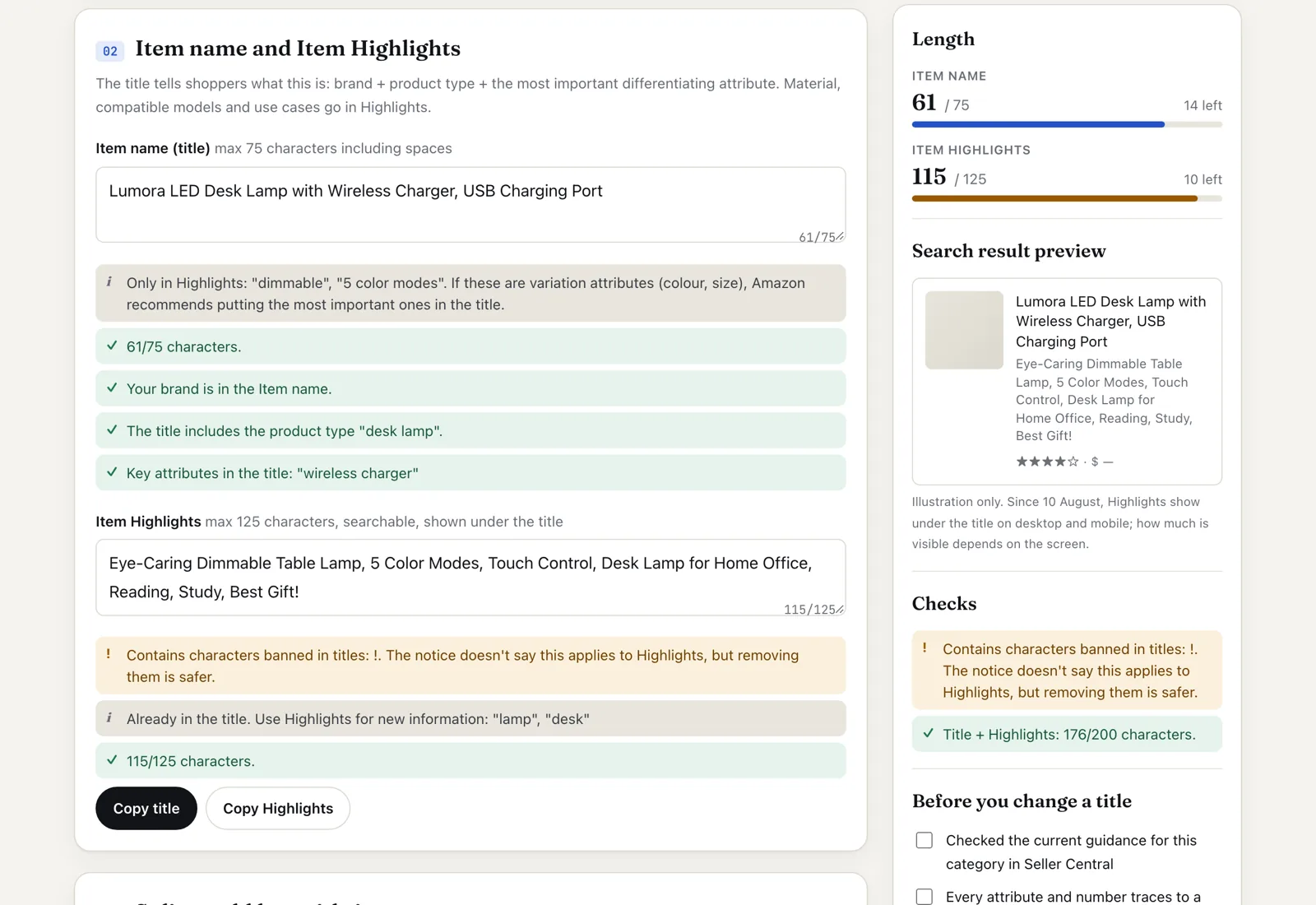
Screenshot taken 29 Oct 2026 in the free Amazon Title Checker with its example loaded: the old 170-plus-character title split into a 61-character Item name and 115 characters of Item Highlights, with the "!" in Highlights flagged.
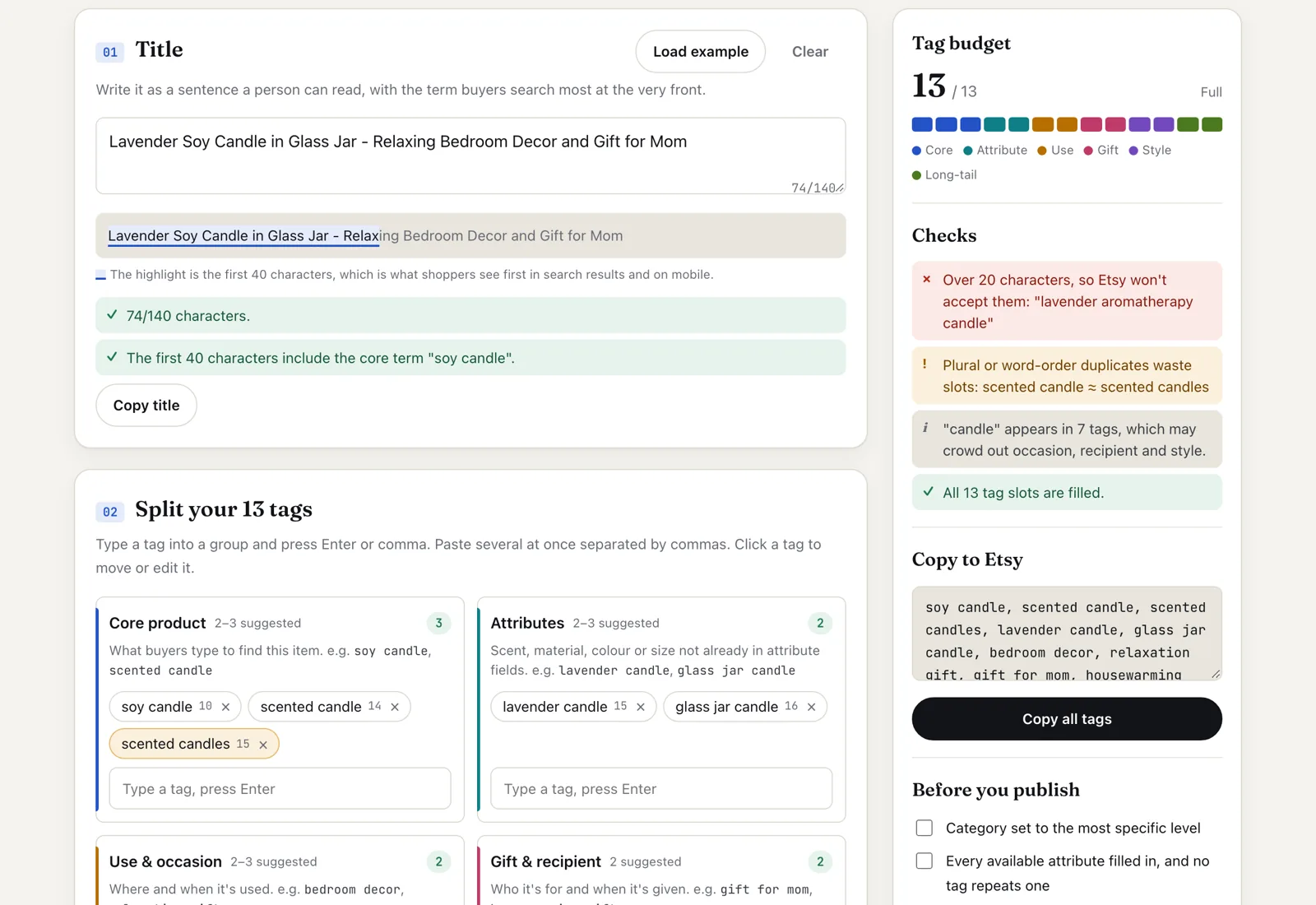
Screenshot taken 29 Oct 2026 in the free Etsy Tag Planner with its example listing loaded. "lavender aromatherapy candle" is flagged because it is over 20 characters, and "scented candles" is flagged as a plural duplicate of "scented candle".
FAQ
Can I skip Step 1 and just generate the product photo with AI? For the actual listing photo, no. Buyers and marketplace policies both expect the photo to represent the real item. AI-generated scene or lifestyle images have a place, but around a real product photo, not instead of one.
Does the same source paragraph really work for all three platforms? The facts should be identical across all three (dimensions, materials, what's in the box); only the format and tone should change. If a fact seems to need changing per platform, that's a sign the source paragraph was incomplete, not that it's fine to have three different "truths" about the same product.
Can AI write the listing straight from the photo? It can describe what it sees, but a photo doesn't show material, exact dimensions or what's in the box, so the model fills those in with guesses. Use the photo for your own reference while writing the fact block, and give the AI the fact block, not the image.
Should the Etsy and Shopify descriptions be different? Yes, in tone and structure. Etsy shoppers compare many similar listings and scan for details; your own store can carry more of your brand voice. The facts underneath stay the same.
How often should I regenerate listings? Only when a fact changes (new size, new material, different box contents) or you're deliberately rewriting for search. Regenerating for the sake of it creates drift between platforms without making the listing more accurate.
For drafting and reformatting, see ChatGPT or Claude; for support-reply automation once your listings are live, see how small Shopify teams automate customer support with AI.
Before you publish, check the Amazon title with the Amazon Title Checker and the Etsy tags with the Etsy Tag Planner.